Overview
If you have an active scheduled payment and would like to skip a single payment without canceling the entire schedule, you can use the Pause Next Payment option.
Steps
Log in to your account.
Navigate to Scheduled Payments.
Select the scheduled payment you want to modify.
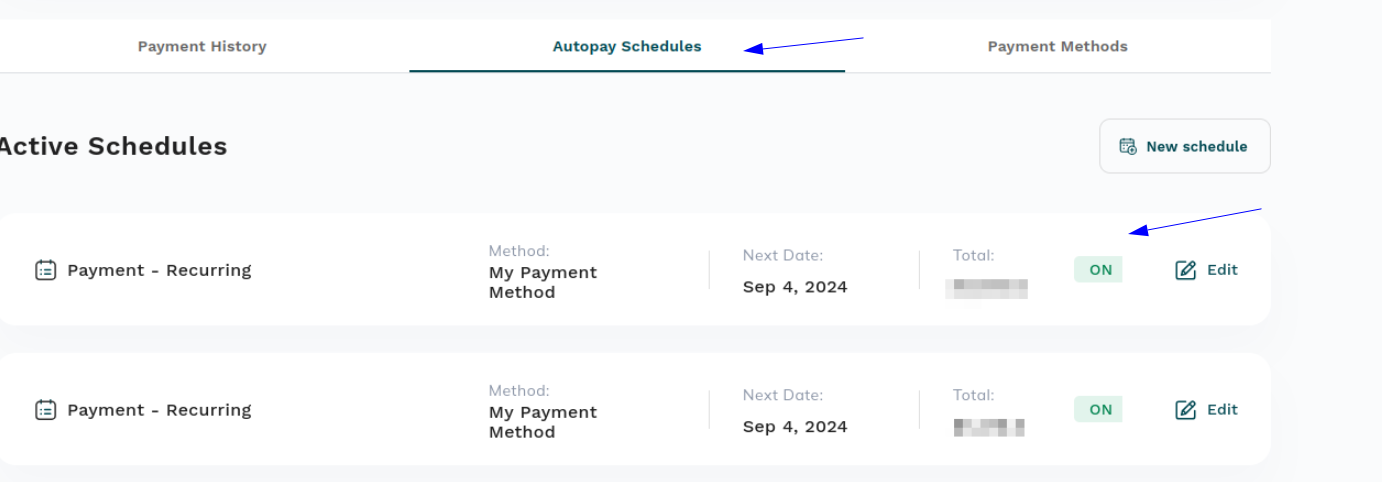
Click Edit.
Select Pause Next Payment.
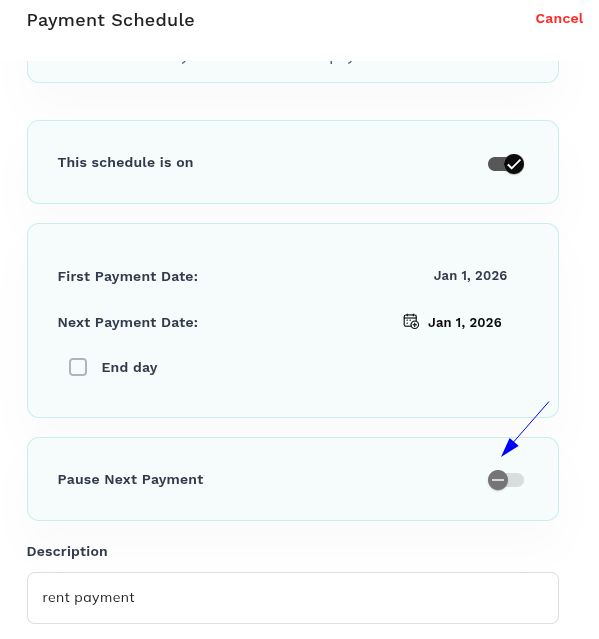
Save your changes.
What Happens Next?
The next scheduled payment will be skipped, and the payment schedule will automatically resume with the following scheduled payment date. There is no need to create a new schedule or re-enable the existing one.
Notes
This option only pauses the next scheduled payment.
Future scheduled payments will continue as normal after the skipped payment.
If you need to stop all future payments, you should cancel the schedule instead of using the pause option.
Was this article helpful?
That’s Great!
Thank you for your feedback
Sorry! We couldn't be helpful
Thank you for your feedback
Feedback sent
We appreciate your effort and will try to fix the article